Thursday, January 12, 2012

Google+ 2.1.1 - Inverted and Transparent (updated 11/5)

Credit to B-boy™
This is the latest version from the market..

It installs like a normal app and has a working widget.. I think everything is good on this one so enjoy!


Uninstall your old market version before installing mine...


DOWNLOAD LINKS:


Version 2.1.1

1. http://bit.ly/DarkGooglePlus211 Inverted


2. http://bit.ly/ClearGooglePlus211 Transparent


3. http://bit.ly/StockIconsDarkGplus211 Stock Icons Inverted


4. http://bit.ly/StockIconsClearGplus211 Stock Icons Transparent


Version 2.1


1. http://bit.ly/DarkGPlus21 Inverted G+ 2.1


2. http://bit.ly/FixedClear21Gplus Transparent G+ 2.1


3. http://bit.ly/StockIconsDarkGpus21 Stock Icons Dark


4. http://bit.ly/StockIconsClearGplus21 Stock Icons Clear


Screen shots are being dumb so you just gotta click on it from a pc..


Attached Thumbnails

  • Attached Image: CAP2011101220371.jpg
  • Attached Image: CAP201110131230.jpg
  • Attached Image: CAP201110131228.jpg
  • Attached Image: CAP201110131219.jpg
  • Attached Image: CAP201110122037.jpg
  • Attached Image: CAP201110120949.jpg
  • Attached Image: CAP2011101312191.jpg

Gmail 2.3.5.2 - Inverted and Transparent (updated 10/3) COLORS ADDED!!

Credit to B-boy™
This is the newest version on the market.. I still left links to the older version just in case.. Thanks to ecsnead69 for icons and helping me locate a few things...... Enjoy!

On the screenshots, the blue icons and the blue divider are from my theme.. they're not in the app


Installation Guide:


1. You need to check if Gmail is located in the system partition or Data first. To do this the easy way is to go to settings/apps/manage/all/Gmail and if you have the option to uninstall then it's data.. otherwise it's system.. or, use root explorer and go check both partitions.. 

2. If your's is in data/app then just uninstall your's and then this one will install like a normal app. If you get any fc's at first, go to settings/apps/manage/all/Gmail or Dark Gmail and clear cache and data from the app.. that fixes it.

3. If your's is in system/app use Titanium Backup or root explorer to uninstall the app and then REBOOT... then install this one. It'll install to data so if you get any fc's, clear cache and data in the app or move it to system.. I've had all of mine in data and they were originally in system and I've had no issues at all... 


DOWNLOAD LINKS:


Version 2.3.5.2


INVERTED:


1. http://bit.ly/Dark2352Gmail Dark Gmail


2. http://bit.ly/BlueDark2352Gmail Blue Dark - either leave it in data or push to system


3. http://bit.ly/CyanDark2352Gmail Cyan Dark


4. http://bit.ly/GreenDark2352Gmail Green Dark


5. http://bit.ly/PinkDark2352Gmail Pink Dark


6. http://bit.ly/RedDark352Gmail Red Dark


7. http://bit.ly/YellowDark2352Gmail Yellow Dark


TRANSPARENT:


1. http://bit.ly/Transparent2352Gmail Clear Gmail


2. http://bit.ly/BlueTransparent2352Gmail Blue Clear


3. http://bit.ly/CyanTransparent2352Gmail Cyan Clear


4. http://bit.ly/GreenTransparent2352Gmail Green Clear


5. http://bit.ly/PinkTransparent2352Gmail Pink Clear


6. http://bit.ly/RedTransparent2352Gmail Red Clear


7. http://bit.ly/YellowTransparent2352Gmail Yellow Clear


Version 2.3.5


Inverted


1. http://bit.ly/DarkGmailGrayReadBG Lighter gray background for read messages - Update.zip so flash in recovery 


2. http://bit.ly/DarkGmailDarkGrayReadBG Dark Gray background for read messages - Update.zip so flash in recovery


3. http://bit.ly/signedGmailBlackedOutDarkGrayReadBG Signed apk install.. make sure you uninstall Gmail from system, reboot, install this one.. if it fc's, move it to system/app, rename it Gmail.apk, reboot... 


Transparent


1. http://bit.ly/Transparent235Gmailapk signed apk


2. http://bit.ly/Transparent235Gmailzip update.zip


Tuesday, January 10, 2012

Boycott SOPA Android App

Download Link:
Boycott SOPA
Description:
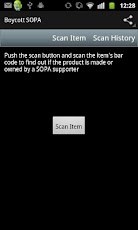
SOPA (Stop Online Piracy Act) if passed will drastically change the internet for the worse. This app will help you avoid SOPA supporting products to show your displeasure with the bill and help get it voted down! Read more about SOPA here.
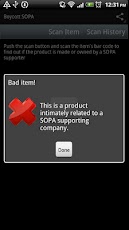
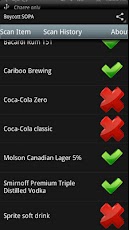
What it is: A free android application that you can use to scan bar codes to help identify if products are either created by or intimately related to SOPA supporting companies. There are currently over 800 brands/companies on our list. The list currently being used by the application is available on our website listed below.
This application will help you identify goods of companies which according to publically avaliable sources appear to have been supporting SOPA as of approx. January 5th 2011, but the list will be updated as we go.
It is intended as an aid to identifying such products but should not be relied upon. You should carry out your own check in case of any product this app indicates is a product of a company supporting
SOPA is not.
Please visit our site at www.nomoresopa.com for more information
IMPORTANT: To all the folks asking why it requires other permissions- this app ONLY requires internet permissions. It does require the barcode scanner app made by the ZXing (google/open source) team to be installed on your phone, and nothing else - this app does the image processing to decode the barcode.) Our app makes one request over the internet to our server to find if the product is a SOPA supporter. We do not access any other data.

White HTC EVO 4g with Black & White Skin

Monday, January 9, 2012

Top Android HTC EVO 4G Apps for 2012


#1 SpeakToIt Assistant (Siri Alternative for Android)
#2 Streamzoo (Instagram Alternative for Android)
#3 RealCalc Plus (Full Scientific Calculator)
#4 Tweetcaster Pro (Makes Tweeting Fun)
#5 Circle Launcher (Keeps Homescreen Clutter-Free)
#6 Swipe Pad (Keeps Homescreen Clutter-Free)
#7 App 2 Sd (Helps Save Internal Memory)
#8 KeePass Droid (Save Passwords Securely)
#9 Craigslist Mobile (Great For Viewing & Posting)
#10 Google Authenticator (This Along with 2 Step Verification Helps Keep Your Google Account Secure)